
Hybrid Printing: The Future is Here
What is Hybrid Printing?
First off, we need to define what ‘hybrid’ printing means. The concept of hybrid printing is genuinely understood to refer to a combination of digital and analogue print technology with inline conversion capabilities.
It was designed to combine the benefits of roll-to-roll digital printing with flexo printing and finishing on a single platform for one-pass manufacturing.
Why Hybrid: What are the Benefits?
The shift toward run shorter lengths, as well as variable and creative needs are posing a growing challenge to the analogue label press business.
Flexo presses, and even combination analogue process presses with quick-change and automated set-up – both press and finishing – have been able to meet brand demands to some extent, but have increasingly struggled to accommodate shorter runs and the need for frequently changing variable content.
Recent trend analyses show that businesses are transitioning to hybrid printers with a CMYK + digital functions, and all of the essentials of in-line analogue printing, embellishing, and finishing equipment.
In fact, the more complicated finishing options have been especially appealing to those looking to enhance their brand image.
Hybrid printing provides the ‘best of both worlds’ as a comprehensive one-pass manufacturing tool which eliminates “contact points” where human interaction is required which leads to higher productivity and significantly reduces lead time.
Once a hybrid press is installed, it quickly begins to give major benefits to converters’ day-to-day operations, and also helps to improve their overall bottom line.
In addition, many hybrid machines generate new revenue and added value by utilizing the numerous hybrid printing and finishing options now made available by industrial printing manufactures.
Hybrid printing combines the advantages of flexo and advanced digital printing to provide the flexibility to create and adapt designs more freely. New opportunities for product identity also come with this new innovation, which suits the market trend for shorter but more sophisticated run lengths.
Embellishments, spot colors, varnishes, and more, are made possible with hybrid printing, all while keeping the quality and efficiency that digital printing effectively gives.
Is Hybrid Printing Right for You?
Traditional printing and finishing, digital printing, digital prepress procedures, inks, and toner all require optimal compatibility for successful label printing.
Having too many processes, each with their own set of specific requirements, makes problem-solving during servicing more difficult, and hinders the overall optimization of your printing process.This is why going hybrid is an important consideration for many companies looking to increase production on their on-demand short-run productions without transitioning to the old ways of the flexographic press.
In lieu of this new industry growth, Arrow Systems, Inc. was able to accelerate the development of new products by collaborating with Memjet’s new DuraFlex digital technology.
Through this collaboration, Arrow Systems has been able to adapt to the ever-changing market, and offer high-speed solutions that are at the cutting edge of digital printing and finishing equipment.
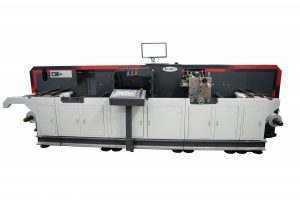
Most recently, the growing demand for new printing technologies has helped create the newest addition to the Arrow Systems family, with the all-in-one ArrowJet Aqua 330R Hybrid.
With complete variable data capabilities, the Arrow Hybrid supports ‘on the fly’ modifications between complex jobs, while production and printing costs have a positive impact on the usually high operating and digital consumable expenses businesses usually find while printing jobs separately.
The shift to hybrid systems has decreased setup time and increased the high quality of printing methods often associated with flexographic printing processes. With the new innovations in digital print, it has made the quality between these two processes almost non-existent.
The challenge was how to combine all of the requirements of businesses looking to integrate multiple creative processes into a single solution which inevitably became hybrid technology. It combines all the advantages of digital printing, with the capabilities and quality of conventional flexo printing for short-print runs. The best part of all this? No plates are used during the entire inkjet printing process.
Hybrid printing allows for a one-stop solution for your label printing needs. With the rise of more versatile technology to come to market, and with shorter lead times and greater flexibility on all your print runs, the possibilities take on a whole new perspective when it comes to many of the benefits of hybrid digital printing.
Looking for more information on hybrid printing? We are experts in inkjet technology, including all things analogue, and know what you need to make the transition to hybrid printing a successful one. Contact us today for a free consolation.