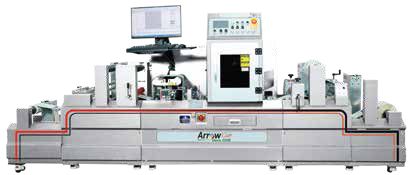
Diagram of fixed single-pass printheads beside a scanning multi-pass print carriage

Table of Contents

Single-Pass vs. Multi-Pass Printing: How to Choose

Direct answer: Single-pass printing is usually evaluated for repeatable production speed because media moves beneath a fixed print array. Multi-pass printing builds the image through repeated carriage movements and can suit lower-volume, wider-format or more varied work. The better choice depends on the complete job mix, not speed alone.

For business buyers, the decision should connect package or print performance to the complete workflow. That means looking beyond a sample image or headline machine speed. Material qualification, artwork control, operator steps, finishing, inspection and the way the finished item is used all affect the result.

What the process needs to accomplish

Understand the motion difference

In single-pass inkjet, printheads span the print width and the substrate advances through one imaging zone. In multi-pass equipment, a carriage travels across the substrate repeatedly as media advances. Those architectures affect productivity, footprint, maintenance, defect behavior and media handling.

Compare saleable output, not headline speed

Rated speed does not include file processing, loading, changeovers, cleaning, drying, finishing or rejected output. Build a test using representative jobs and measure approved finished pieces per shift. Include difficult solids, fine text, variable data, barcodes and the substrates that make up real demand.

Plan maintenance and redundancy

A nozzle issue can create a persistent line in a single-pass direction, so automated maintenance, nozzle compensation and inspection matter. Multi-pass patterns can mask some defects, but more carriage motion can extend production time. Ask how operators detect defects, clean heads, recover from stops and document quality.

Decision criteria for buyers and operators

Use a written specification so vendors and internal teams are comparing the same application. The following checklist is a starting point, not a substitute for product-specific testing.

AreaQuestions to resolve
Job volumeAverage, peak and urgent demand by shift
FormatPrint width, image area, substrate thickness and handling
QualityColor, fine detail, solids, codes and acceptable defects
WorkflowRIP, loading, drying, finishing and inspection
OwnershipCapital, ink, maintenance, labor, waste and uptime

Weight these criteria by business risk. A small visual difference may be acceptable on a shipping label but not on a primary retail package. Likewise, a fast press does not solve a job if approved rolls wait at lamination, cutting or inspection. The comparison should end at saleable finished output.

How to build a reliable implementation plan

  1. Document the current state. Record job volumes, versions, materials, lead times, waste, defects and outsourced steps. Separate measured data from estimates.
  2. Define acceptance criteria. Set requirements for appearance, dimensions, codes, durability, handling and finished-roll or package format.
  3. Run representative trials. Include easy and difficult jobs. Use production artwork, normal environmental conditions and the intended downstream process.
  4. Check the full workflow. Measure setup, imaging, drying or curing, finishing, inspection, packing and changeover. Note operator intervention and rework.
  5. Approve and control. Store approved settings, samples, profiles, materials and files. Define who may change each element and how changes are reviewed.

Arrow Systems describes plate-free production and version handling in its guide to short-run digital packaging jobs. Buyers can also compare broad categories of digital label printing systems, digital flexible packaging printers, label finishing equipment. Product-page specifications should be confirmed for the configuration being quoted.

Common tradeoffs and mistakes to avoid

  • Optimizing one step: A faster printer can overfeed a slow finisher; a low-cost substrate can create adhesion or waste problems.
  • Using untested claims: Terms such as durable, recyclable, food-safe or economical need a defined construction, test method, intended use and market.
  • Testing only perfect artwork: Trials should include fine text, barcodes, solids, variable fields and changeovers that resemble routine work.
  • Ignoring people and maintenance: Training, cleaning, calibration, spares, safety procedures and service response are part of capacity.
  • Buying for an average day: Review peak demand, rush jobs and the cost of downtime without assuming the largest machine is automatically best.

A useful business case shows assumptions and ranges. It should distinguish verified performance from supplier targets, and it should state what remains to be proven. That makes the recommendation easier for operations, finance, quality and marketing to review together.

Before approval, assign an owner for the specification, trial record and retained sample. Record the material lot, software or artwork version, equipment settings, environmental conditions and inspection result. That record makes reorders easier to troubleshoot and prevents an informal setup from becoming an uncontrolled standard. If a supplier or component changes, review the affected tests instead of assuming the previous approval still applies.

Frequently asked questions

Write down the product, substrate, run profile, exposures, quality targets and constraints before comparing equipment or materials. A representative test is more useful than a generic specification.

No. Cost depends on volume, versions, setup, material, labor, waste, maintenance, inventory and finishing. Compare the complete finished workflow and use conservative assumptions.

Use approved artwork, the intended material and finishing steps, realistic production speed, and documented acceptance criteria. Inspect samples immediately and after the expected handling or storage exposure.

Share dimensions, substrates, annual and peak quantities, SKU count, change frequency, required durability, finishing, delivery format and any product- or market-specific requirements.

Review it when materials, artwork, suppliers, regulations, distribution conditions or equipment settings change, and use defect, waste and customer data for periodic improvement.

Ready to improve your label or packaging workflow?

Talk with Arrow Systems about your application, materials, production goals, and the equipment options that may fit.