What Is Flexible Packaging? Formats, Materials, and Digital Printing
Learn how flexible packaging is used, how pouches and rollstock differ, which barrier and seal questions matter, and where digital printing fits.
Smart labels help brands connect physical packaging to digital information, giving customers a way to learn more without crowding the label itself.
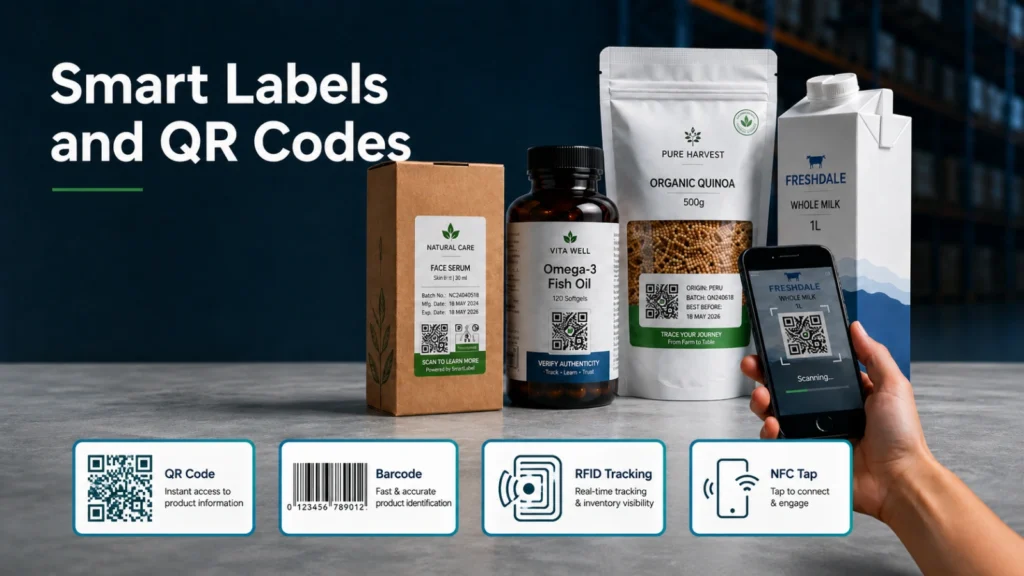
Smart labels use scannable codes, such as QR codes or standard UPC barcodes, to connect a product label with additional information. Instead of trying to fit every detail onto a small package, a brand can use the label as a gateway to a website, product page, or related digital resource.
The core idea is simple: customers increasingly want more context before they buy. A smart label can help make that information accessible while keeping the physical label cleaner and easier to read.
A QR code, short for quick response code, was designed to be read quickly and can store information both horizontally and vertically. That format lets it carry more information than a traditional one-dimensional barcode.
For product labels, this can be useful because the code can point customers toward more detail than the package has room to display. The original article highlights examples such as product origin, process details, packaging information, sustainability context, and other information a shopper may want to review before choosing a product.
Packaging often has to balance two competing needs: provide useful information and stay visually appealing. Smart labels can help reduce clutter by moving supporting details to a digital destination while preserving the main label for branding, required information, and clear product communication.
This is especially relevant when a brand wants a more minimal label design. Instead of forcing every story, specification, or background detail onto the printed surface, the label can invite the customer to continue the experience online.
The original article also notes that smart labels and QR-linked data can support label production workflows. In digital label production, different labels may be produced on a single web path, and linked data can help identify or separate job information during finishing.
That workflow concept matters for businesses producing many short-run or variable label jobs. A smart label strategy is not only a consumer-facing communication tool; it can also become part of how label jobs are organized and processed.
A smart label works best when the scan leads to genuinely useful information. The code should not be treated as a decoration; it should connect the buyer or workflow to something worth accessing.
Define whether the code opens instructions, authenticity information, traceability data, recycling guidance, a campaign, or a product record. The destination should be mobile-friendly, owned by the organization, and useful after the campaign ends. Do not move mandatory on-pack information behind a QR code unless applicable rules explicitly allow it. Requirements differ by product and jurisdiction, so regulatory and legal teams should review the final label.
Code size, contrast, quiet zone, print resolution, surface curvature, gloss, distortion, and damage can affect scanning. Test the final artwork at production size on the actual material and package, not only on a monitor. Sample across the web and after finishing. Check several common devices, lighting conditions, distances, and package orientations. Keep a human-readable fallback when the linked information is operationally important.
A printed code may remain in the market for years. Use stable redirects, assign an owner, control destination changes, monitor broken links, protect customer privacy, and document what each code version should resolve to. Plan for recalls, discontinued products, language versions, and domain changes. Variable-data label printing can support unique or versioned codes, but the data source, verification rules, and exception handling must be designed before production.
Turn broad expectations into checks an operator can repeat. An approval record should identify the artwork version, dimensions, approved material, print settings, color reference, required readable text, barcode or code grade where applicable, finishing path, roll direction, core and roll limits, and the defects that require a stop or hold. Include representative photos or retained samples when visual judgment matters. Assign who may approve a first article and who may authorize a material, file, or process substitution.
Then test the job at the points where risk enters: file intake, first print, after a roll change, after finishing, and after realistic application or handling. Sample across the web and over the run rather than checking one convenient label. Record failures and corrective actions in the job history. This discipline helps teams distinguish a design problem from a media, printer, finishing, or application problem and prevents an unreviewed change from becoming the new standard.
| Review area | Questions to document |
|---|---|
| Application | What must the label communicate, survive, and fit? |
| Materials | Which facestock, adhesive, liner, ink or toner, and coating are approved? |
| Production | What are typical and peak volumes, changeovers, roll formats, and acceptance criteria? |
| Finishing | How will labels be cut, inspected, stripped, slit, rewound, packed, or applied? |
| Validation | Who approves samples, records settings, controls changes, and handles failures? |
For current planning, review current digital label printer options, label finishing systems, label materials and application support. Verify the exact configuration, material, and application rather than relying on a category name alone.
It is a physical label that uses a machine-readable element, such as a QR code, to connect a package or item with digital data or content.
Do not assume it can replace mandatory on-pack content. Requirements vary by product and jurisdiction.
Use strong contrast and adequate code size and quiet zone, then test the final printed package on multiple devices.
A managed redirect can allow updates, but ownership, security, records, and long-term link maintenance are essential.
Validate data, code uniqueness where used, print quality, finishing, scan performance, destination behavior, and exception handling.
Talk with Arrow Systems about your application, materials, production goals, and the equipment options that may fit.

Learn how flexible packaging is used, how pouches and rollstock differ, which barrier and seal questions matter, and where digital printing fits.

Compare laser and analog label finishing by tooling, changeovers, materials, run length, quality, workflow, and total cost before selecting equipment.

Table of Contents Arrow Systems to Exhibit at LOUPE Americas 2026 Chicago, IL — Arrow Systems Inc. will exhibit at LOUPE Americas 2026, taking place

Table of Contents Overlaminate vs. Varnish Labels: How to Choose Protection Film overlaminate protects against immersion, wash-down, and solvents; UV and aqueous varnish suit retail

Table of Contents Digital Label Printers for Stickers and Labels: How to Choose the Right Press The right printer for stickers and labels depends on

Table of Contents Blade vs. Laser Label Die Cutting: Accuracy, Speed, and Cost per Label Blade die-cutting suits simple shapes and long runs; CO2 laser