Cannabis Label Versioning Workflow

Table of Contents

Cannabis Label Versioning Workflow for Multi-State Brands

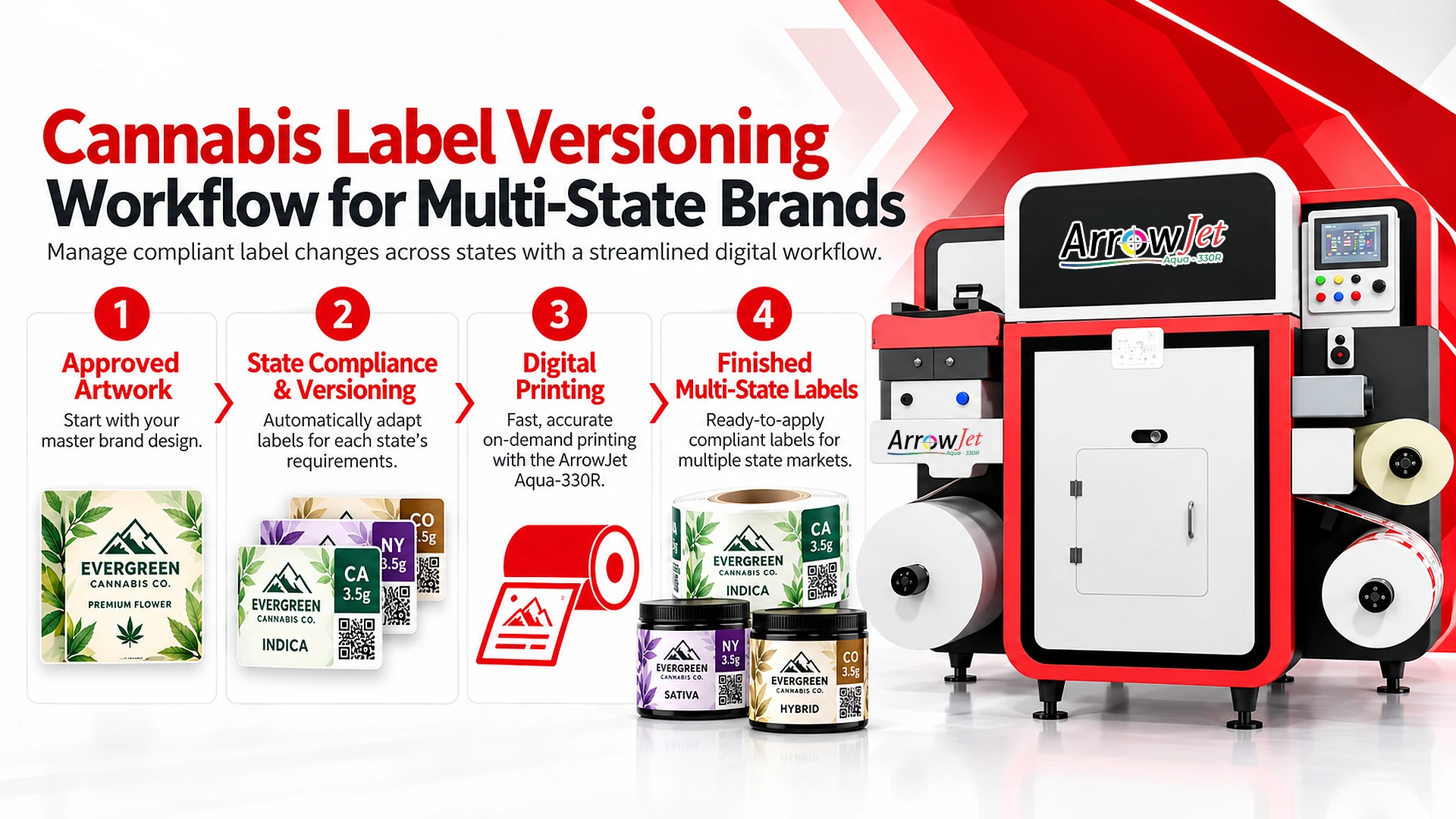
A cannabis label versioning workflow produces state-specific labels from one master template by moving state-variable fields in as print data.
If you hold licenses in five states, you do not have five compliance problems. You have a production-control problem. This guide is for cannabis operations, packaging, and compliance leads who own artwork release and press scheduling, and it covers the master-template structure, the variable-data field map, the run-grouping method, and the version-level QC checklist.

Requirements vary by state and change frequently. Verify current rules with your regulator or compliance counsel before releasing any artwork. What follows is the operational system that sits underneath those rules.

Key Takeaways

  • Treat multi-state labeling as a production-control problem: product count multiplied by license count makes the artwork file library grow faster than the business.
  • Use one master template per product family and die, with locked brand zones and controlled variable zones that each have a character limit, a minimum type size, and a defined overflow behavior.
  • Keep state content in a state-version data table owned by compliance, and merge it with batch-level data (lot, test date, UID) so one print pass produces the correct version and the correct lot data.
  • Group runs by substrate and finishing first, then die, then state version, so low-volume states share one setup instead of triggering separate minimums.
  • Verify every version with its own proof, a first article at each version transition, scanned barcodes and UIDs, labeled rolls, and a retained print record.
  • A new die, substrate, structural layout, or finishing spec is a new base template and usually a new run. A change inside the existing frames is a data record.

Why State-by-State Cannabis Versioning Is an Operational Problem, Not Just a Compliance Problem

Each state multiplies label SKUs, artwork files, minimum orders, and obsolete inventory, which makes versioning a production-control problem.

The regulatory text is the input. The cost sits downstream of it: a file library that duplicates every product for every market, flexo minimums that force you to buy more labels than a state version will consume, short changeovers that burn setup time and substrate, and inventory that becomes scrap the moment a state updates its packaging and labeling rules.

How one product becomes many label SKUs

A single 100mg gummy pouch can generate a dozen label SKUs without a formulation change. Multiply your product count by your license count, and the label file library grows faster than the business does. The variables that typically differ by market are listed below.

Warning symbol or icon

The required warning symbol or icon and its placement differ by state.

Warning text block

The mandated warning text and its content differ by state.

Potency declaration format

Format differences include per serving versus per package, THC/CBD ordering, units, and rounding conventions.

Licensee identification and license number

Licensee name and license number fields vary by license and by market.

Track-and-trace or UID zone

Zone dimensions and encoding differ by market.

Serving-size, dosage, and testing statements

Required statements and their wording differ by state.

Language, font-size, and contrast requirements

Type size, contrast, and language rules differ by market.

Where the cost actually lands

Most teams underestimate how much of the expense sits outside the label itself.

Duplicated artwork

When each state version is its own file, a brand refresh or a potency format update means dozens of files to re-edit, route for approval, and reorder.

Minimum order quantities

Conventional flexo economics push you to buy quantities a low-volume state version will not consume before the next rule revision.

Storage and obsolescence

Rolls sit in racks tied to one destination market, and a packaging rule update turns them into scrap.

Changeover drag

High-mix, short-run label production repeats plates, dies, and setup for every version.

The risk view

The operational failure mode is applying the wrong state version to product destined for another market. That can lead to quarantine, relabeling, schedule disruption, and a reportable compliance event. A governed versioning workflow reduces operational risk; it does not eliminate regulatory risk and does not replace compliance review.

Setting Up a Master Template System for State Versions

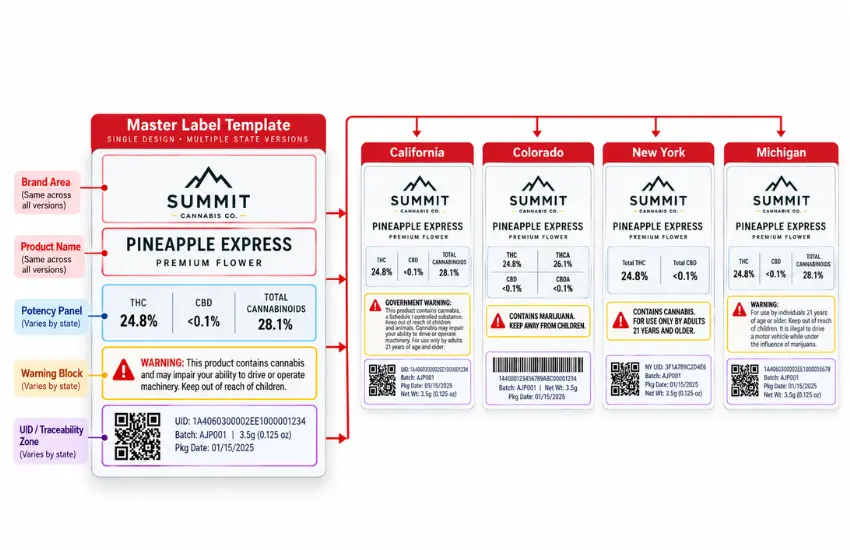
Use one master template per product family, with locked brand zones and controlled variable zones populated from a state-version data record

Fixed zones vs. controlled variable zones

Zone category

Fields

How it changes

Fixed zones

Brand mark, logo lockup, and color system; product name and flavor/strain descriptor position; structural die line, bleed, and safe-area boundaries; net weight and net contents placement; brand copy, web address, and social handles

Only through a formal artwork revision owned by brand

Controlled variable zones

State warning symbol or icon frame; state warning text block (fixed frame, variable content); potency/THC-CBD declaration panel and its format; licensee name and license number field; serving, dosage, and testing statements; track-and-trace / UID area (symbol type, size, quiet zone); batch/lot number, test date, packaged-on or expiration date

Populated per state version from a data record

The discipline lives in the frame, not the content. Each variable zone gets a maximum character count, a minimum type size, and a defined overflow behavior, so a longer state warning block cannot push into brand artwork or the die line.

Naming conventions and version locking

Pick a naming scheme a production planner can read at a glance and that sorts correctly in a file browser, for example PRODUCTFAMILY_SIZE_DIE_STATE_TEMPLATEVERSION_DATE. These rules are worth enforcing:

  • Keep one source-of-truth master per product family and die, with no local copies.
  • Use semantic versioning, where a structural change bumps the major version and a text-block change bumps the minor version.
  • Lock the layers for fixed zones, and limit edit permissions to the artwork owner.
  • Record a revision log entry for every state version change, including approver and date.
  • Archive superseded versions out of the active print directory instead of deleting them.

Ownership and approval gates

Ambiguous ownership is where wrong versions come from, so each zone gets an owner.

Owner

Owns

Approval role

Brand/marketing

Fixed zones

Approves any change that touches fixed zones

Compliance

State-variable content: warning text, potency format, required statements

Signs off on each state record before it enters the print-ready library

Production/packaging

Die line, substrate, finishing spec, and the data mapping between the state table and the template

Closes the production gate for each state record

No state version becomes print-eligible until all three gates are closed for that record.

Building for the next license, not just current states

Design the template to absorb a new market without a rebuild. Size the warning block frame for the most demanding content you have encountered, and reserve a UID zone even in states that do not require one. Keep the potency panel modular so a different declaration format becomes a data swap rather than a layout redesign.

Variable Data Printing: What Gets Swapped Per State and What Stays Fixed

State-level and batch-level fields move as data in variable data label printing; die, substrate, layout, and finishing changes need a new template.

Data-driven fields

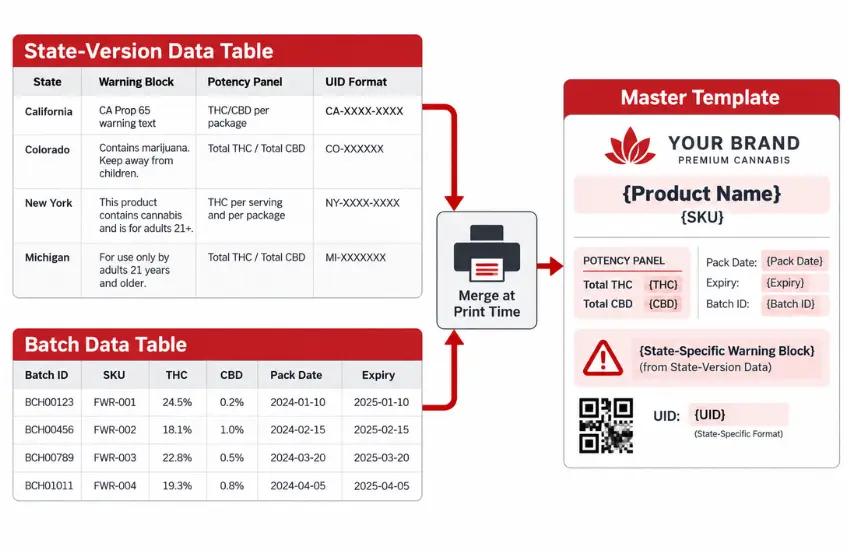
In a well-built variable data printing (VDP) setup for cannabis labels, these fields typically move as data.

Data layer

Fields

Maintained in

State-version record

State warning text strings and the associated symbol asset reference; potency declaration values and the format template that renders them; license number and licensee name; serving and testing statement blocks

State-version data table

Batch-level record

Barcode, QR, and UID payloads; batch/lot, test date, and package date

Batch data table

Variable data printing workflow merging state-version and batch data into a cannabis label master template.

What requires a new base template

Variable data has practical limits. Plan for a separate template, and usually a separate run, when you change any of the items below.

Change

Why it needs a new template or run

Die shape or label size

A different cut means different tooling and a different press setup.

Substrate or adhesive

Facestock, liner, and adhesive changes affect feed, ink interaction, and finishing.

Structural layout

A booklet, extended-content, or wrap-around construction is a different product, not a version.

Finishing spec

Lamination, varnish, and cold foil differences generally group separately. Downstream options are covered in Arrow’s label finishing systems.

The rule of thumb: if it changes what the press and finisher are physically doing, it is a new run. If it only changes what renders inside the existing frames, it is a data record.

Mapping a state-version data table to template fields

Maintain a single state-version table (a spreadsheet, CSV export, or database view) where each row is one state version and each column maps to a named template field. Add a second table, or extend the same one, for batch-level data: lot number, test date, and UID string. A practical mapping approach follows.

  1. Name every variable field in the template exactly as its column header in the data source.
  2. Validate the file before submission: character counts, required-field completeness, and barcode payload format.
  3. Merge state-level and batch-level records so one pass produces the correct state version and the correct lot data.
  4. Version the data file alongside the template so the print record reflects both.

Where operations automation fits

This is the point where labeling stops being a procurement task. When the state-version table, ERP item master, production schedule, and seed to sale system feed the print job, automation removes the manual re-keying that produces most version errors. Integration depth varies by platform, so scope connectivity (file formats, network access, API availability) during system evaluation rather than after.

Scheduling State-Specific Runs Without Wasting Substrate or Setup Time

Group jobs by substrate and finishing, then die, then state version, so low-volume states share one setup instead of separate minimums.

Group by substrate and die first, then sequence versions

Build the schedule in this order every time.

  1. Substrate and finishing. All jobs on the same facestock and lamination spec group together.
  2. Die and label size. Within substrate, group by tooling to avoid changeovers.
  3. State version sequence. Inside that group, order versions as data records; the press does not stop between them.
  4. Batch data merge. Apply lot, test date, and UID at the record level within each version.

Consolidating low-volume states

Low-volume markets are where minimum-order economics hurt most. If three states share a substrate and die, they belong in one scheduled run, not three procurement events with three minimums and three sets of leftovers.

Illustrative run-grouping example

The following is an illustrative example, not a performance claim or a quote. A brand produces a 1 oz flower jar label on one substrate and one die across four markets. Weekly demand might run 4,000 for the largest market and 600 to 900 for each of the other three.

Approach

Orders

Minimums

Setups

How versions are handled

Handled conventionally, per state

4

4

4

Each state is its own order with its own substrate load and die setup

Grouped as one scheduled run

1

1

1

One substrate load and die setup, with four version segments sequenced inside it, each carrying its own batch data

Teams that move from separate per-state runs to grouped variable data runs often report meaningful reductions in setup waste and obsolete inventory. Actual results depend on label size, substrate cost, version count, and volume mix. Treat any figure you are given as a starting hypothesis to model against your own numbers.

Print close to use

Track and trace, batch, and test-date data frequently arrive late in the schedule. Printing closer to fill removes the guesswork: labels are produced once the batch data exists, aligned to the fill sequence, and staged by destination market instead of held as speculative inventory.

QC: How to Verify the Right Version Printed Before Labels Leave Production

Prove the right version printed with per-version proofs, first articles, scanned codes, labeled rolls, and a retained print record.

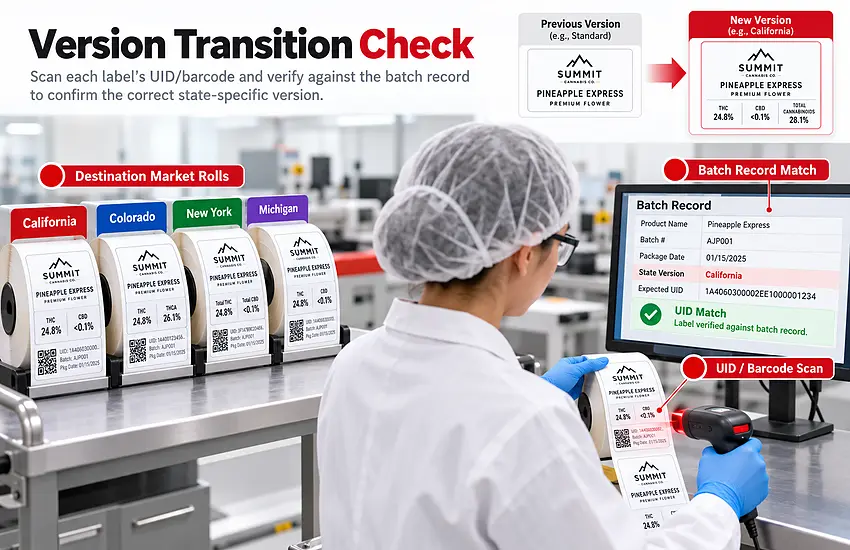
Operator verifying a scanned cannabis label barcode against the batch record before rolls leave production.

Pre-run proof and first-article sign-off per version

Every version in a grouped run gets its own proof, not one proof for the whole run. Compliance approves the state-variable content, and production approves placement, legibility, and die registration. When the run starts, pull a first article at each version transition and sign off before the segment continues.

Barcode, UID, and data-integrity checks

Scan, do not eyeball. Confirm that the barcode or UID decodes to the expected payload, that the decoded value matches the batch record, and that grade and quiet-zone requirements are met. Spot-check data integrity at the start, middle, and end of each version segment to catch mid-run data drift.

Roll identification and segregation

Every finished roll should carry a physical or printed identifier showing product, template version, state version, batch, quantity, and destination market. Segregate staged rolls by destination so a filling line cannot pick the wrong version without breaking a rule.

Retained print record

Keep a print record with the batch file: template version, data file version, state version, quantity printed, quantity scrapped, roll IDs, approvals, and scan verification results. That record answers “which version and which data printed on this lot?” months later without reconstructing it from memory.

Operator checklist

  1. Confirm the work order state version list matches the loaded data file.
  2. Verify substrate, die, and finishing spec against the job ticket.
  3. Check that an approved proof is present and signed for each version in the run.
  4. Pull a first article and sign it at every version transition.
  5. Scan the barcode/UID and match the decoded value to the batch record.
  6. Spot-check variable fields for truncation, overflow, and blank values.
  7. Apply a roll ID with state version and destination market.
  8. Complete the print record and file it with the batch documentation.

ArrowJet Aqua 330R: How Variable Data Printing Supports This Workflow

The ArrowJet Aqua 330R is a water-based digital inkjet label press that prints versions as data, with no plates between state versions.

The ArrowJet Aqua 330R is one of Arrow Systems’ digital label printers, and it supports this workflow structurally rather than incrementally. The core specifications are summarized below.

Specification

ArrowJet Aqua 330R

Press type

Roll-to-roll digital inkjet label press

Print engine

Memjet DuraFlex®

Ink

Water-based pigment inks (CMYK)

Print resolution

Up to 1600 x 1600 dpi

Print speed

90, 150, or 195 ft/min

Maximum print width

12.75 in (324 mm)

Four capabilities matter for multi-state cannabis labeling.

Plate-free version changeovers

Because versions are data rather than tooling, moving from one state version to the next inside a grouped run requires no new plates. That makes sequencing multiple state versions in a single scheduled run practical instead of theoretical.

Record-level variable data

Version-level content (warning blocks, potency format, license fields) and record-level content (batch, lot, test date, UID) merge and print in the same pass. Late-arriving track-and-trace data no longer forces a second production step.

Short-run economics across many SKUs

Digital production supports printing to the quantity a state version actually needs. That is the direct lever against minimum-order overbuying and obsolescence when rules change.

Fit considerations

Configuration depends on your substrate and adhesive set, die and label geometry, finishing requirements (lamination, varnish, slitting, rewind), and how label data connects to your ERP, scheduling, and seed-to-sale systems. Evaluate those variables against your actual label set rather than assuming them.

Label content and state compliance remain the brand’s responsibility and should be confirmed with your regulator or qualified compliance counsel. Arrow Systems sells label printing hardware; Arrow does not provide regulatory or compliance advisory services.

Frequently Asked Questions — Cannabis Label Versioning for Multi-State Brands

Common questions from cannabis operations, packaging, and compliance teams building a state-by-state label versioning workflow.

No, and separate files are usually the root of the problem. A better structure is one governed master template per product family and die, with state-specific content held as records in a state-version data table. Brand and structural zones stay locked, while state warning content, potency format, license fields, and UID zones populate from data. You still need a separate base template when die shape, substrate, or structural layout changes. This collapses a large per-state file library into a small set of masters plus a maintainable data source.

Yes. In a variable data workflow, version-level fields and record-level fields merge into the same template at print time, so one pass can produce the correct state warning block along with the correct lot, test date, and UID. This matters because track-and-trace and testing data often arrive late in the schedule. Printing close to fill, with both data layers merged, avoids holding pre-printed inventory while you wait for batch information and avoids a second application step.

Treat the state version data table as a controlled document with a named compliance owner, a review cadence, and a change log. When a market updates its requirements, you edit one record instead of re-issuing dozens of artwork files, then route it through the compliance and production approval gates before it becomes print-eligible. Because production is print-to-demand, exposure to obsolete pre-printed inventory is lower. Requirements vary by state and change frequently, so confirm current rules with your regulator or compliance counsel before releasing updated artwork.

The fields that typically differ by market are the warning symbol and its placement, the warning text block, the potency declaration format, licensee and license number fields, the track-and-trace or UID zone, serving-size, dosage, and testing statements, and language, font-size, and contrast requirements. In a governed workflow these live in a state-version data table rather than in separate artwork files.

A new base template, and usually a separate run, is needed when die shape or label size, substrate or adhesive, structural layout, or finishing spec changes. If the change only alters what renders inside the existing frames, it is a data record. If it changes what the press and finisher are physically doing, it is a new run.

Request a Label Versioning Assessment from Arrow Systems

If your state-by-state label library has grown faster than your product line, map it before you change anything. Arrow Systems offers a structured assessment that inventories your current state versions, identifies which fields can move to variable data, and models run-grouping and print-to-demand scenarios against your substrate, die, and volume mix.

Bring a sample set of your current state versions and roughly 90 days of production schedule, which is enough to evaluate the ArrowJet Aqua 330R against your actual label set and finishing requirements.