
Types of Label Printing Techniques
Printing dates to 3500 BC when Elamite and Sumerian civilizations used cylinder molds to certify documents written in clay. Upon the conception of printing, various other technologies have grown and adapted to our societal needs and desires.
This article will dive into various forms of printing technologies and what benefits and drawbacks each unique printing style offers to its user. More specifically, we will look at analog printing methods like Flexographic printing, Gravure printing, Screen Printing, as well as the latest in Digital printing, to ascertain the pros and cons of each individual technology for roll labels.
Flexographic Label Printing
Flexographic printing was introduced in the late 1800’s and was essentially a modified version of the letterpress. Flexo printing, as it is commonly referred to in the label world, implements a rotary printing style, where printing plates are custom made from rubber molds to then fit on cylinders.
When a Flexo printer is operating, these molds press on the label media leaving behind the desired image. Flexographic printing has been on the fore front of the evolution of label printing due to its speed and large run capabilities.
Flexo allows for thousands of labels to be printed and laminated in -line at a high rate of speed. Flexo printing can use virtually any label media to produce a quality product. Since you need a custom plate for every color, CMYK, there is a significant start up time associated with this style of printing. Molds must be made prior to the printing process.
Due to this disadvantage, most Flexographic printers tend to stay away from short runs or small jobs. The plates are unique for certain jobs, so changing jobs on the fly or making small modifications to the prints then becomes a lengthy process.
Gravure Label Printing
Gravure printing, like Flexographic, implements a rotary style printing process. Large copper plated metal cylinders are custom made unique to each job. As the media passes through the press, a print cylinder draws ink from the ink reservoir. The media is then pressed between the print cylinder and the impression cylinder leaving the media engraved with ink, to which it must dry before being passed on the next color print cylinder.
Due to the durable of the metal cylinders, Gravure printing is perfect for long runs with high volumes. The quality of the image being produced is very consistent with little impurities. Gravure printing offers lower per-unit costs, however, to meet this margin, you must have exceptionally large runs.
Gravure printing, like flexographic, has a significant start up time needed to get the press operational. In fact, hundreds of thousands of copies are needed for the prints to be profitable. The construction of the cylinders also is a long and tedious process that typically leads to long lead times and large MOQ’s.
Often the case with Gravure printing, people who use this technology tend to turn short run customers away due to the set-up costs making the jobs not profitable enough to take on. It is also important to note that the customization ability of Flexo and Gravure printing is limited due to the time required to cast molds for individual jobs. So seasonal promoting and small modifications to artwork can often not be done or can be awfully expensive.
Screen Printing
Screen printing is unique in the fact that every print is essentially done by hand. Screen printing consists of transferring a design, made on a stencil, using ink and a squeegee. Screen printing found its niche in the clothing industry and quickly became the “go to” for textile branding. Like the previously mentioned printing technologies, screen printing has a long set up time.
The stencils take time to set up, then each color is implemented individually to the media. The more colors the design implements means an increased time on set up and production. Each screen is unique in the fact that they allow a certain amount of ink to pass through the screen, so for a design with 4 colors, 4 screens would be needed for the application, each unique to the color that is being laid down.
Screen printing excels when designs require only one or two colors, but when more colors and layers are added to the design, costs, and labor rise. In screen printing, larger runs are where money is made.
Digital Label Printing
Digital label printing gained popularity at the end of the 20th century. Digital label printing has gained popularity amongst label printers due to the low initial set up cost and on the fly customization that it offers. Print quality used to be a concern when considering inkjet printing, but technology has advanced to the point where mid-range digital printers can match flexo or offset printing quality with ease.
Files are uploaded to the printer, via software such as Adobe Illustrator, the printers computer stores files in a cloud drive where users can pull them out and send them through the printer. In terms of large runs, digital label printers might not be as beneficial as some of the before mentioned technologies, but short runs and customization is where digital label printers are reaping the benefits.
Digital printing technologies don’t require any added start up time, there is not engraving of cylinders or casting of molds. You simply upload a file and press “print.” This allows for custom stickers to be edited or modified on the fly, giving the user full customization of colors, size, and media being used for their product labels. This allows for digital label printers to take on smaller jobs because the initial start up cost is virtually nothing, so no job is too small for these systems.
Digital label printers can be divided into two sub-families, toner systems and inkjet systems. Some inkjet printers require an inkjet receptive media to be used. The scope of media compatibility is ever growing as digital label printing gains popularity.
Holographic materials and flexible packaging materials are some examples of unique media that can be printed. Inkjet systems typically print CYMK, but with the evolution of UV inkjet printing the multitude of colors continues to grow.
Digital label printing encompasses another technology called, Laser printing or more commonly referred to as toner systems. Toner systems use a printing process called electrostatic digital printing.
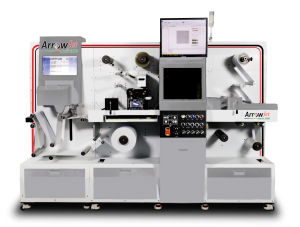
This process uses a laser beam that passes back and forth over a negatively charger cylinder or drum to charge an image. The drum collects the electrically charged powdered ink, more commonly referred to as toner, and transfers the image to the media.
The image and media is then heated to fuse the design to the media. A hot commodity in the label printing game is white ink. Toner systems are going to be the most cost-effective solution to achieve white ink.
Toner systems also create some of the most durable labels on the market, even without lamination, labels can be protected from the environment during the fusing process making that an added benefit of working with them.
Digital label printers typically require two systems to achieve the desire label look. The first is the digital label printer and the second is the label finishing system.
The label finishing system is what cuts out the labels, removes the matrix, and laminates. Due to the two-system design, label printers have tended to stay away from digital label printing because technologies like Flexo and Gravure are more streamlined.
In recent years, with the development of laser die-cutting technology, inline systems have gained popularity. Laser finishers added inline with a digital label printer offer optimal results for their user. Today, digital label printers have moved to the fore front of the label printing world, offering more customization, higher print resolution, and more customization to their users then out dated technologies of the past.