Digital Label Converter Equipment for Short-Run Brand Accounts
Table of Contents Digital Label Converter Equipment for Short-Run Brand Accounts Winning short-run brand accounts takes a matched stack: a right-sized digital press, fitted finishing,
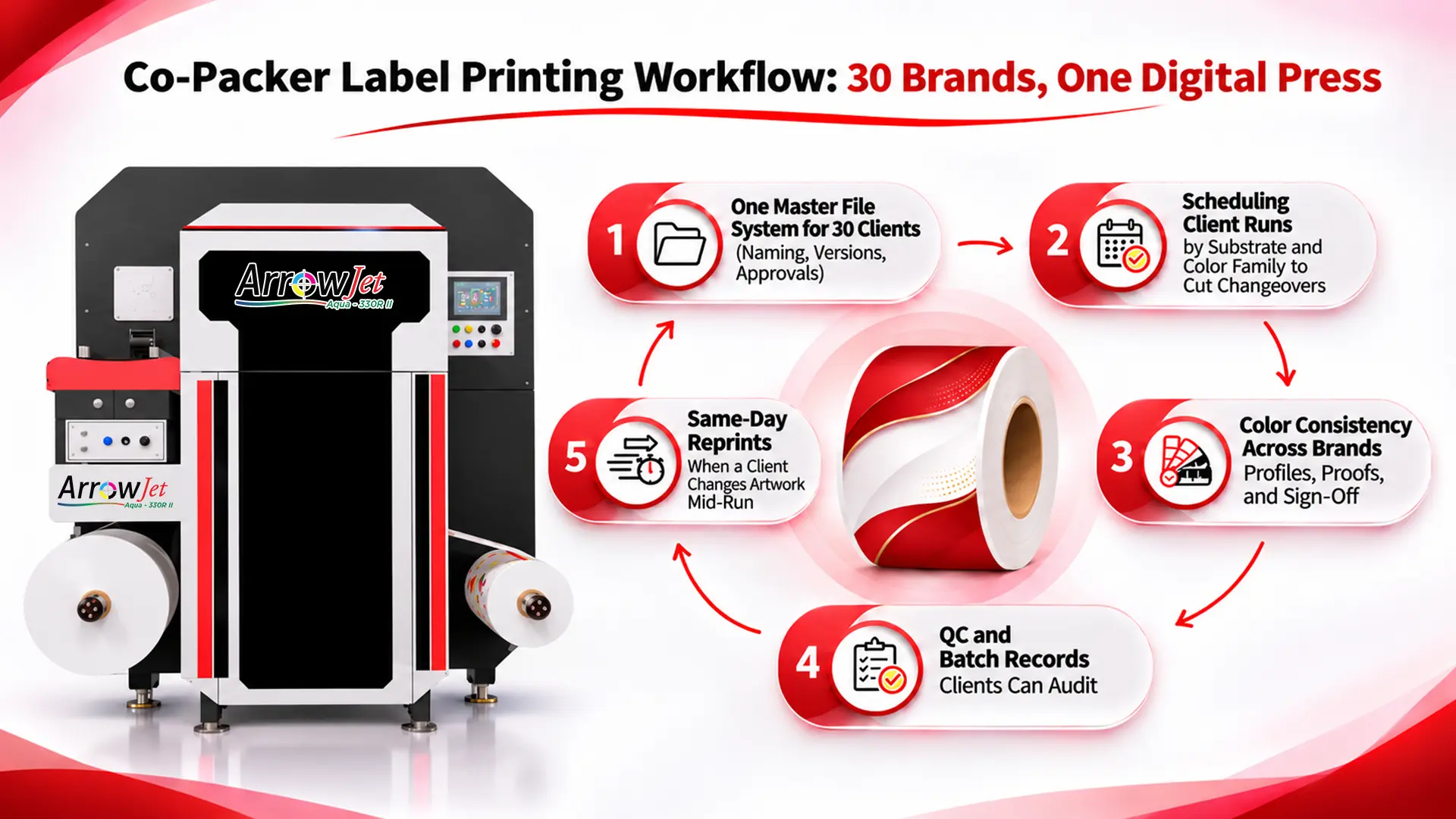
A co-packer label printing workflow lets one digital press run labels for dozens of brands without mixing revisions, rolls, or color standards.
Labeling errors caused 71.1% of FDA major food allergen recalls with a known root cause in FY2013–2019, and co-packers carry that risk.
This guide is for operations, QA, and packaging leads at contract packagers who run labels for dozens of brands on shared equipment. Brand owners control the artwork, but the co-packer owns the execution risk. If a superseded ingredient statement gets applied, the chargeback or quality hold usually lands on the co-packer, even when the client sent the file late.
The recall data shows how much of that risk sits in label control. A Journal of Food Protection analysis of 1,471 allergen and gluten recalls of FDA-regulated foods from fiscal years 2013 to 2019 found that labeling-associated errors caused 71.1% of major food allergen recalls with a known root cause (914 of 1,286). In USDA-regulated meat and poultry, undeclared allergens accounted for 15 of 65 FSIS recalls in calendar year 2023.
Consider a typical 7:40 a.m. Tuesday. The schedule covers six brand clients on three substrates: white BOPP for two beverage SKUs, clear film for a skincare line, and uncoated paper for a candle brand. An email arrives with a revised UPC for a SKU that runs at 10:00. The workflow determines whether that change lands cleanly or becomes a quality hold.
Now multiply that by 30 clients. Each one has its own revision cadence, approval chain, and color expectations. One brand updates claims quarterly, while another pushes promo flags every few weeks, so there is no single label calendar to plan against.
Outsourced converters add friction to co-packer label lead time. Lead times measured in weeks, with minimum order quantities sized for long runs, don’t fit short, fast-turn client orders. A late label becomes a stopped line, and leftover pre-printed rolls become the co-packer’s storage problem.
FDA reviewers of allergen recalls from September 2009 to September 2012 found that using the wrong package or an incorrect label was the most common root cause. In a co-packing operation, that root cause shows up in three ways:
The wrong revision
A superseded file, such as an old UPC, claim, or ingredient statement, is printed or applied. Governed files (Step 1) and the controlled reprint path (Step 5) close this gap.
The wrong roll
A correctly printed roll for one client or SKU is pulled for another. Roll IDs tied to batch records (Step 4) close this gap.
The right roll on the wrong line
The correct roll is loaded onto a line running a different SKU or client. First-article and barcode verification at every client changeover (Step 4) close this gap.
Give every client file one home, one naming rule, and one approval gate, so only one released revision per SKU component can print.
Artwork arrives by email, client portals, and shared drives, but it all feeds one press. Client label file management starts with a single location and a single naming rule for every file, regardless of how it arrived.
Pattern
CLIENT_SKU_COMPONENT_REV_YYYYMMDD
Example
ACME_0142_FRONT_R03_20261020: client ACME, SKU 0142, front label, revision R03, dated October 20, 2026.
This is an example, not an industry standard. Adapt it to your ERP and client codes.
Incoming (unapproved)
Every file lands here first. Nothing prints from this folder.
Approved/Released
The only folder the print queue can read.
Superseded/Archived
Retained for audits and locked from printing.
Rule: one released revision per SKU component at a time. This single rule is the core of co-packer label version control.
Operations automation helps in two places. Automated file intake and naming checks reject nonconforming filenames, and releasing R04 automatically archives R03.
A label changeover between brands costs the most when the press bounces between materials, so group runs by substrate first.
Sequence each day in this order:
Tie this sequence to a fixed weekly label production window that runs ahead of the filling and packing schedule. Labels should be staged before the line needs them, not printed while the line waits.

Illustrative example (not a benchmark): the same six jobs on the same press, sequenced two ways.
Sequence | Order of runs | Substrate changes |
Ungrouped | Paper → BOPP → Clear → BOPP → Paper → Clear | 5 |
Grouped | BOPP ×3 → Clear ×2 → Paper ×1 | 2 |
Within each substrate block, keep laminated jobs together so the label finishing setup changes as rarely as the substrate does. Schedule-driven print queues that pull only released files, in sequence, are a practical entry point for contract packaging operations automation.
Co-packers lose client trust over color when “match the last run” was never written down, so store a signed standard per client.
Brand color consistency depends on a documented per-client color standard stored with every job. Each standard has the following parts:
Substrate-specific ICC or output profile
A color profile built for the client’s actual substrate, not a generic profile shared across materials.
Signed physical reference or measured values
A print or set of measurements the client has approved, kept as the target for every future run of that SKU.
Spot-color targets
Defined target values for any brand-specified spot colors, recorded where the brand specifies them.
Agreed color tolerance
The tolerance the client accepts, verified with a spectrophotometer. Tolerances aren’t universal: a cosmetics brand may hold a hero color tighter than a household-products client does, so document the agreed value and who approved it.
Be candid about gamut. Some spot colors may fall outside what a given ink set and substrate can reproduce. Show the client the closest achievable result on their actual material, and get sign-off on that print, not on a swatch book. That signature is what keeps brand color consistent across runs.
Re-verify the reference whenever the substrate lot changes. A new lot can shift whiteness enough to move color results, and catching that shift at first article costs far less than catching it after application.
Capture the same ten fields for every client run, so each client can audit its own label records without seeing another client’s data.
Contract packaging label QC should produce records any client can review in isolation. Capture these fields for each client run:
Field | What to capture |
Client and SKU | Client code and internal SKU |
Artwork revision ID | Revision from the released file (e.g., R03) |
Approver and approval date | Name and date from the written sign-off |
Substrate and lot | Material and supplier lot |
Print date and operator | Who printed the job, and when |
Roll IDs | Every printed roll |
Quantities | Printed, applied, and scrapped |
First-article sign-off | Inspector and time |
Retained sample | Sample ID and storage location |
Barcode verification | Verifier grade against the client’s specification (GS1 minimum for EAN-13 and UPC-A: 1.5/06/660) |
Run first-article inspection and barcode verification at the start of every client run, not only the first run of the day.
Log revision IDs to batch records automatically from the released file instead of typing them. Pulling the revision ID from the file removes a common transcription error.
Structure records so they filter by client, and export only that client’s data when the client audits you.
GS1 barcode verification for EAN-13 and UPC-A retail barcodes grades each symbol against a minimum print quality of 1.5/06/660, set in the GS1 General Specifications. That notation means an ISO/IEC overall symbol grade of 1.5 on a 4.0 scale (equivalent to ANSI grade C), measured with a 6-mil aperture at a 660 nm wavelength. GS1 directs that print quality be measured with a barcode verifier conforming to ISO/IEC 15426-1 for linear symbols. Record the grade, not just pass or fail, and check whether the client or retailer specification sets a higher minimum.
Several of the steps in this workflow mirror label-control requirements in U.S. federal regulations. Which rules apply depends on the client’s product category:
Regulation | Product scope | Requirement | Workflow step |
21 CFR 211.125(c)–(d) | Finished drugs, including OTC | Reconcile labeling issued, used, and returned; destroy all excess labeling bearing lot or control numbers. Reconciliation is waived for cut or roll labeling only with a 100% examination for correct labeling. | Step 5: reconcile and destroy |
21 CFR 211.130(e) | Finished drugs, including OTC | Inspect packaging and labeling facilities immediately before use to confirm prior product and unsuitable labeling are removed, and document the result in the batch production record. | Step 4: changeover inspection |
21 CFR 111.410(b) | Dietary supplements | Control the issuance and use of labels and reconcile discrepancies. Cut or rolled labels are exempt from reconciliation only with 100% electronic or electromechanical examination. | Steps 4 and 5: issuance and reconciliation |
21 CFR 117.135(c)(2) | Human food facilities with allergen hazards | Food allergen preventive controls include labeling the finished food so it is not misbranded under FD&C Act section 403(w). | Steps 1 and 4: approved artwork and verification |
Regulatory compliance is the responsibility of the brand owner and the co-packer and should be confirmed with qualified regulatory counsel. Arrow Systems sells label printing hardware and does not provide regulatory or compliance advisory services.
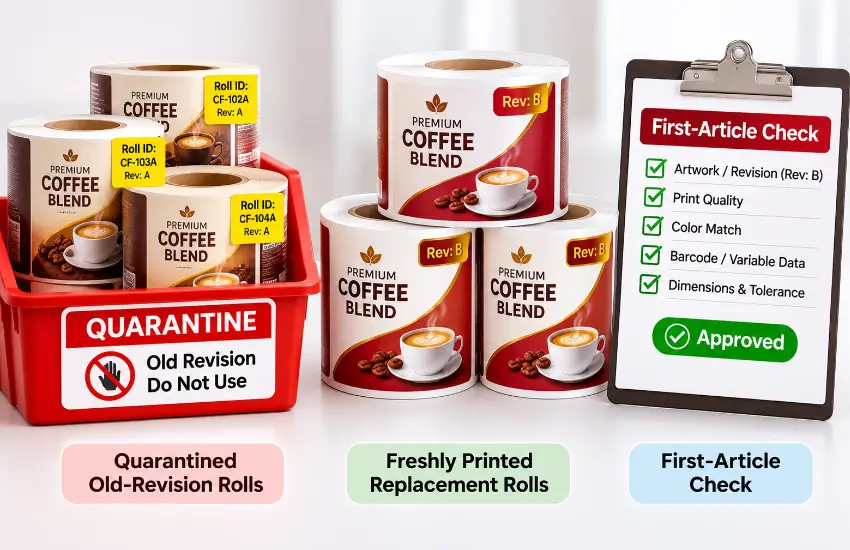
When artwork changes mid-run, control matters more than speed: quarantine, re-approve, reprint, verify, reconcile, and document.
Claims change, UPCs get corrected, and retailers add promo flags. When a change hits mid-run, follow the same six steps every time:
Short-run digital label printing in-house turns this into a same-day path instead of a wait on a converter. Quarantined rolls are destroyed and counted, not left on a shelf, which matches the reconciliation and destruction rules for drug labeling in 21 CFR 211.125.
Agree the cut-off rule in the contract. One example: changes received before a set time apply to work-in-process, and later changes apply to the next lot. Set the terms with each client upfront so nobody negotiates them during a line stop.
The disciplines come first; an in-house digital press removes plates and long-run minimums so short client runs become workable.
Moving contract packager labels in-house onto digital label printers makes short client runs and same-day reprints practical. Arrow Systems, an industrial label printer hardware manufacturer and integrator, offers two presses that fit this workflow.
ArrowJet Aqua 330R II: multi-client roll label production
The ArrowJet Aqua 330R II is a roll-to-roll digital label press built on the Memjet DuraCore™ engine, with a 12.69″ (322 mm) print width and print speed modes of 90, 150, and 220 ft/min. It uses adphos aNIR® near-infrared drying. It suits short, high-mix multi-client label production where files change often and quantities stay small.
ArrowJet Aqua 800M: clients who also need pouches
The ArrowJet Aqua 800M is a wide-web press for flexible packaging printing, built on the Memjet DuraCore™ engine with water-based pigment inks, resolution up to 1600 × 1600 dpi, and an 800 mm maximum media width. It extends a co-packer’s in-house capability beyond roll labels to printed pouches and flexible packaging. Film substrates require offline pre-treatment before printing.
Both presses run Memjet engines updated with Memjet Setanta technology.
Factor | ArrowJet Aqua 330R II | ArrowJet Aqua 800M |
Primary output | Roll-to-roll labels | Flexible packaging and wide-web work |
Print engine | Memjet DuraCore™ | Memjet DuraCore™ |
Width | 12.69″ (322 mm) print width | 800 mm maximum media width |
Co-packer fit | Short, high-mix label runs for many brand clients | Clients who need printed pouches alongside labels |
Before choosing, work through these questions:
Confirm speeds, widths, ink options, and substrate compatibility directly with Arrow Systems, using your own client artwork.
Common questions from co-packer operations, QA, and packaging teams running labels for many brand clients on shared equipment.
In-house printing usually fits co-packers with many clients, short runs, and frequent artwork changes. Long, stable runs of a single design may still cost less through a converter. Many operations use both: converters for high-volume legacy SKUs, and in-house digital printing for fast-turn, revision-prone client work.
Use one gated co-packer artwork approval process for every client: preflight, soft proof, written sign-off with approver name and date, then release. Only released files should reach the press queue. Archive and lock superseded revisions so every printed label traces back to a specific approved revision.
Apply controls at three points: the file, the roll, and the line. Allow only released files into the print queue, and enforce client-coded filenames. Tag every roll with an ID tied to its batch record, then verify the first article and barcodes at each client changeover.
Record the client and SKU, artwork revision ID, approver and approval date, substrate and lot, print date and operator, every roll ID, printed, applied, and scrapped quantities, first-article sign-off, retained sample, and barcode verification result. Structure the records so each client’s data can be filtered and exported on its own for audits.
Group the day by substrate and adhesive first, then by color family or ink coverage, then by finishing. Run that sequence inside a fixed weekly label production window ahead of the filling and packing schedule, so labels are staged before the line needs them.
Often. A Journal of Food Protection study of FDA recall data found that labeling-associated errors caused 71.1% of major food allergen recalls with a known root cause (914 of 1,286) in FDA-regulated foods from fiscal years 2013 to 2019. Earlier FDA reviewers identified using the wrong package or incorrect label as the most common root cause.
For EAN-13 and UPC-A retail barcodes, the GS1 General Specifications set a minimum print quality of 1.5/06/660: an ISO/IEC overall grade of 1.5 (ANSI grade C), measured with a 6-mil aperture at 660 nm. Use a barcode verifier that conforms to ISO/IEC 15426-1, and check the client’s or retailer’s own specification, which may be stricter.
Primary sources behind the recall data, regulations, and barcode standards in this guide; check each for updates before relying on it.
If your press is becoming a shared resource for dozens of brands, Arrow Systems offers a structured, no-obligation review for co-packer operations, QA, and packaging leaders.
The review covers your client mix and artwork revision frequency, the substrates and finishing you need, your label lead-time pain points, and whether the ArrowJet Aqua 330R II, the ArrowJet Aqua 800M, or both fit your production. Bring one or two representative client jobs to evaluate color, finishing, and changeover behavior on your own artwork.
Table of Contents Digital Label Converter Equipment for Short-Run Brand Accounts Winning short-run brand accounts takes a matched stack: a right-sized digital press, fitted finishing,
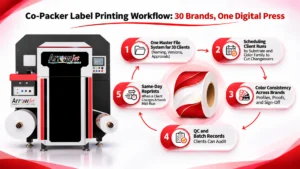
Table of Contents Co-Packer Label Printing Workflow: 30 Brands, One Digital Press A co-packer label printing workflow lets one digital press run labels for dozens
Table of Contents Digital Label Press Total Cost of Ownership: A 5-Year Breakdown Digital label press total cost of ownership is the five-year cost to
Table of Contents Cannabis Label Smudging: Why Pre-Roll and Vape Labels Fail Cannabis label smudging on pre-roll tubes and vape carts has four causes: unprotected
Table of Contents Label Converter Finishing Capacity: Adding Blade and Laser Lines Label converter finishing capacity falls short from volume, job mix, or both. Diagnose
Table of Contents Confectionery Packaging Capacity Planning: Use Q4 Data for ROI Confectionery packaging capacity planning works best on cost data logged during Q4 peak,