When to Add Label Finishing Equipment: ROI & Volume Triggers
Table of Contents When to Add Label Finishing Equipment: ROI & Volume Triggers In-house label finishing pays off past a specific break-even volume — this
In-house label finishing pays off past a specific break-even volume — this guide shows how to calculate it instead of guessing.
The line-item cost on an outsourced finishing invoice is only part of the picture — the real spend hides in operational drag.
Per-unit finishing fees and minimums
Third-party converters price per roll or per thousand, often with order minimums that force you to overpay on short runs.
Freight, handling, and packaging
Every outbound and return shipment adds cost and risk — damaged rolls, misships, and packaging labor that never appears on the finishing quote.
Lead-time cost
Waiting days for finished rolls delays customer shipments, blocks rush jobs, and pushes revenue into the next cycle. Missed same-week orders are the most expensive kind of invisible cost.
Revision and quality friction
A small artwork or die change means another round trip. You lose control over inspection standards and can’t quickly fix a run that isn’t right.
When these costs are added together, many teams find their true finishing spend is materially higher than the invoice suggests.
You don’t need a perfect forecast to know when the math is shifting — watch for these five concrete, observable signals.
Monthly finished-roll volume is trending steadily upward
Volume shows no sign of plateauing — the workload that justifies ownership is already building.
A growing share of orders are rush or same-week
Outsourced turnaround can’t keep pace with the speed customers are now demanding.
Outsourced finishing is rising as a percentage of total job cost
Margin on repeat work gets squeezed as the finishing line item grows relative to the rest of the job.
You have stable, repeat job profiles
Consistent shapes and substrates would run efficiently on owned equipment rather than being re-quoted every cycle.
Finishing lead time is now the bottleneck on your print output
Your press is ready before your finisher is — print capacity is being wasted waiting on an external step.
If three or more of these apply, it’s time to run the numbers rather than guess. The in-house finishing decision is fundamentally a break-even question.
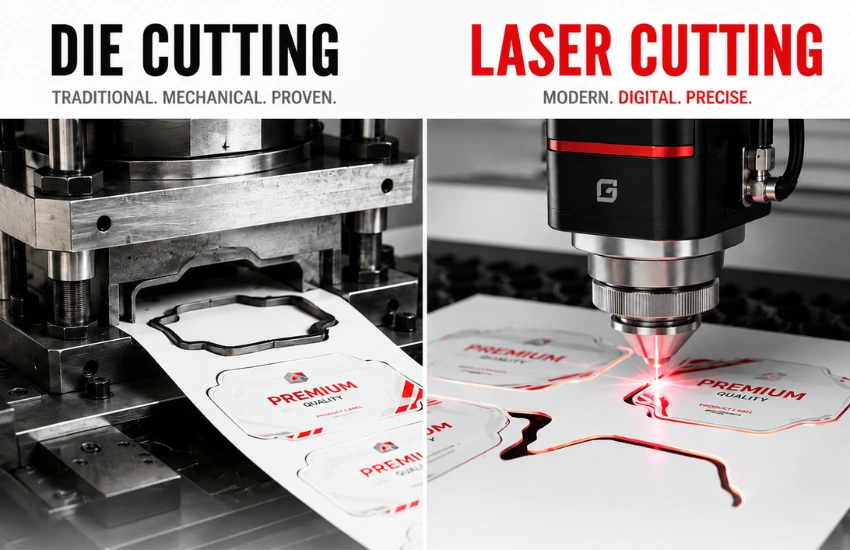
Choosing between blade die cutting and laser finishing depends on your production mix, not on which technology sounds more advanced.
Blade (die-cutting): best for high-volume, stable runs
Blade finishing uses a physical die to cut labels. It shines when you run high volumes of the same shape repeatedly, offering fast throughput once set up, low per-unit cost at volume, and proven, predictable output. Each unique shape requires a die, which is an upfront cost and takes lead time to produce — best suited to long, stable runs where the shape rarely changes.
Laser: best for high-mix, short-run, and frequent shape changes
Laser finishing cuts digitally from a file, with no physical die required. Strengths include no tooling cost, instant shape changes, and suitability for prototypes, versioning, and short runs. Switching shapes is a file update, which suits high-mix production with frequent SKU turnover — best fit for diverse, evolving job profiles where flexibility matters more than raw per-unit speed.
Factor | Blade (Die-Cutting) | Laser |
Setup time | Higher (die install) | Low (file-driven) |
Tooling cost | Per-shape die required | None |
Substrate flexibility | Broad, but die-dependent | Broad; some materials cut better than others |
Changeover speed | Slower | Fast |
Best volume profile | High-volume, stable | High-mix, short-run |
Both technologies connect directly into operations automation: when finishing pulls jobs from your production schedule instead of a manual handoff, you compress lead time and reduce the setup errors that plague send-out workflows.
This five-step walkthrough is reproducible against your own numbers — the figures below are illustrative examples only.
Step 1: Total your current outsourced finishing cost per unit
Divide your total monthly outsourced finishing invoice by units finished. Include any per-job minimums you’re absorbing. Illustrative example: $0.03 per label finished.
Step 2: Add freight, handling, and lead-time cost
Layer in outbound and return freight, internal handling labor, and a value for lead-time delay — for example, the margin cost of shipments pushed to a later cycle. Illustrative example: freight and handling add $0.01/unit; lead-time cost adds another $0.005/unit — bringing fully loaded outsourced cost to roughly $0.045/unit.
Step 3: Model your in-house cost per unit
Add up the owned-equipment costs — equipment (purchase price, amortized over expected life), consumables (dies or laser operating cost, matrix, waste), labor (operator time per run), and maintenance (service, wear parts). Divide the monthly total by your finished volume. Illustrative example: at a given monthly volume, in-house lands near $0.02/unit all-in.
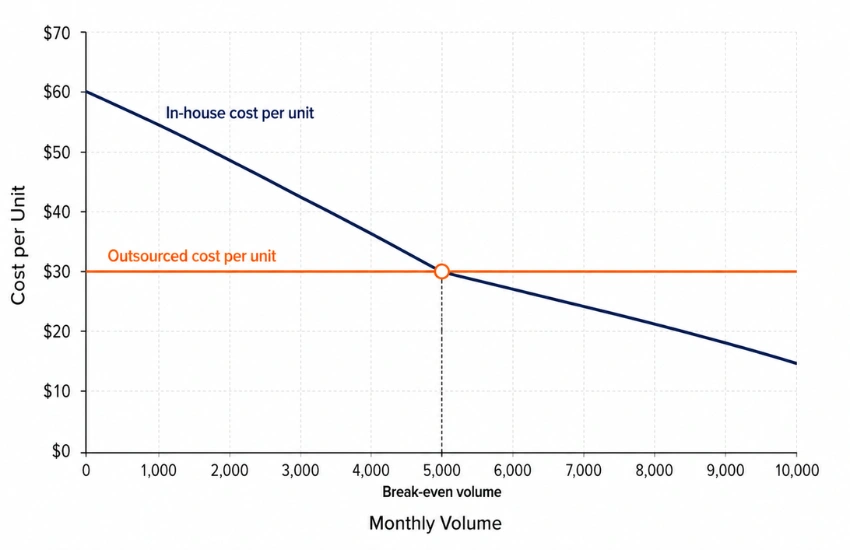
Step 4: Find your monthly break-even volume
Break-even is the point where in-house savings per unit covers the equipment’s monthly cost.
Break-even volume = Monthly fixed equipment cost ÷ (Outsourced cost per unit − In-house variable cost per unit)
Illustrative example: if the equipment carries a $2,500/month cost and you save roughly $0.025/unit ($0.045 − $0.02), your break-even is about 100,000 units/month. Above that, in-house wins; below it, outsourcing may still pencil out.
Step 5: Factor payback period and non-cost benefits
Divide the equipment’s total cost by monthly net savings to estimate payback. Teams often model payback in a typical illustrative range of 12 to 24 months, though this varies widely with volume and mix and should be validated against your own figures. Then weigh the benefits that don’t fit neatly in a spreadsheet: shorter lead times, control over rush jobs, faster revisions, and predictable per-unit cost as you scale.
Once your break-even math points toward ownership, the next step is right-sizing the equipment to your real production profile — not overbuying for volume you don’t have yet.
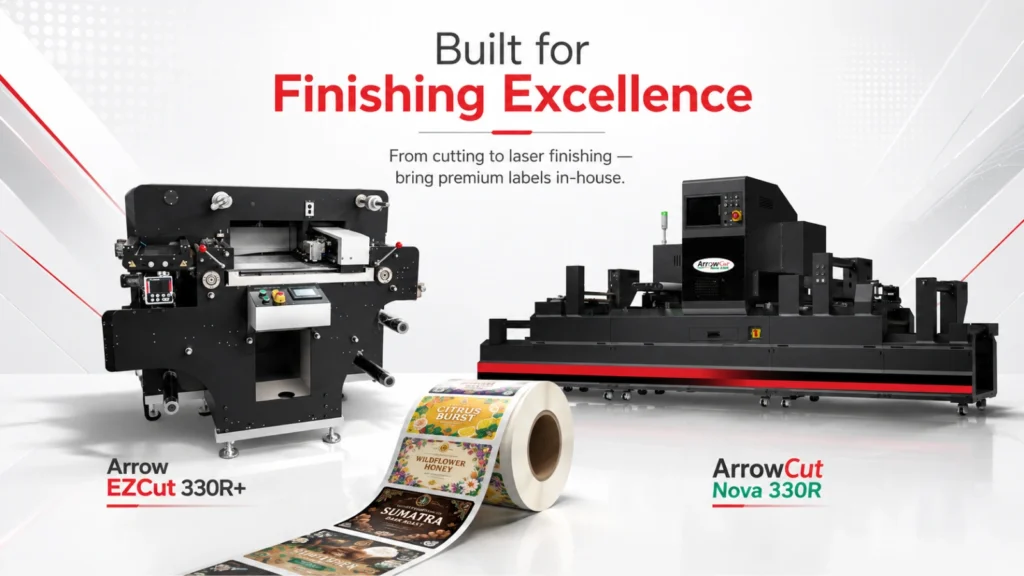
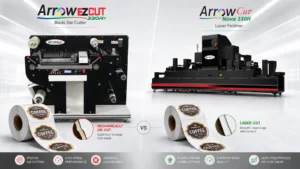
Arrow EZCut 330R+ — flatbed and roll-to-roll hybrid blade die cutting
The EZCut 330R+ is a flatbed and roll-to-roll hybrid blade die cutter with a cutting media width of 100–350 mm, maximum label width of 350 mm, cutting accuracy of ±0.1 mm, and a maximum cutting speed of 150 cuts per minute. It ships with 2 cutting heads (expandable to 4) and 4 slitting blades (expandable to 15), and supports self-adhesive, PP synthetic, aluminum plastic film, PET, PVC, white card, and other flexible materials. Cold lamination and automatic matrix removal and rewinding are built in. This fits producers with steady, repeat runs of stable shapes who value low per-unit cost at scale — the tradeoff is die tooling and slower changeovers, acceptable when your shapes don’t churn.
Arrow EZCut 350R — higher-throughput multi-blade roll-to-roll cutting
The EZCut 350R is a dedicated roll-to-roll multi-blade cutter with 4 cutting heads (expandable to 6), a working speed of 9 m/min, slitting speed up to 100 m/min, and die cutting precision of 0.1 mm across a maximum label width of 330 mm. Where the 330R+ suits operations that mix roll and flatbed jobs, the 350R is built for higher-throughput, consistent label shapes at volume — the right choice for producers running core SKUs at scale. Inline sheeting and automatic job changeover via barcode reader support multi-SKU production runs.
ArrowCut Nova 330R — CO₂ laser finishing for custom shapes
The ArrowCut Nova 330R is a 150-watt CO₂ galvano laser finisher with a 13.7″ web width, throughput up to 10,000 labels per hour, and web guide tolerance of 0.02 mm. It performs die-free split cuts, full cuts, kiss cuts, perforation, hatching, etching, and marking, with inline lamination, slitting, rewinding, and matrix removal. The ArrowCut Nova fits high-mix, short-run, or frequently changing production — if you’re constantly cutting new shapes, running versions, or handling short prototype batches, laser removes tooling cost and lead time so you can change jobs on the fly.
ArrowCut Nova 250R — compact laser finishing entry point
The ArrowCut Nova 250R is a compact-footprint laser die cutter designed to pair with any digital label printer. It performs full cuts, kiss cuts, perforations, and variable data marking in a single pass, with a short web path for fast setup and low waste. It’s the right-sized laser entry point for operations with a smaller footprint or lower initial volume than the Nova 330R is built for.
Base your choice on where your volume and mix are heading over the next 12 to 18 months. A finisher that barely fits today’s load will bottleneck you again soon; one sized far beyond realistic growth ties up capital that could fund other automation. The goal is a right-sized entry point that clears your current work and absorbs near-term growth without overreaching.
Common questions from converters and in-house label producers weighing the outsource-versus-own decision.
There’s no universal number — it depends on your outsourced cost per unit, freight, and equipment cost. Run the Step 4 break-even formula with your real figures. Many teams find the case turns favorable once outsourced finishing becomes a consistent, rising share of job cost and monthly volume is trending steadily upward.
Match the technology to your job mix. Blade (die-cutting) suits high-volume, stable-shape runs and delivers the lowest per-unit cost at scale. Laser suits high-mix, short-run, and frequently changing shapes because it eliminates tooling and enables instant changeovers. If your production is unpredictable, laser is often the safer first step.
Payback varies with volume, mix, and equipment cost. As an illustrative range, teams often model payback somewhere between 12 and 24 months. Validate this against your own net monthly savings rather than relying on a generic figure.
Run your own numbers, then confirm the fit: total your fully loaded outsourced cost per unit, model your in-house cost across equipment, consumables, labor, and maintenance, and find your break-even volume.
Arrow Systems can help validate those numbers and right-size the decision — confirming whether the EZCut 330R+ or EZCut 350R (blade) or ArrowCut Nova 330R or 250R (laser) matches your current production and near-term growth, and how finishing connects into your existing line architecture.

Table of Contents When to Add Label Finishing Equipment: ROI & Volume Triggers In-house label finishing pays off past a specific break-even volume — this

Table of Contents Energy Efficiency in Label Printing Operations Energy efficiency in label printing operations means producing the same output with less energy, less waste,

Table of Contents Personalized Label Printing: How Custom Labels Influence Recycling and Reuse Personalized labels increase consumer attention to packaging — attention that, when paired

Table of Contents Why Cannabis Labels Fail Compliance Inspection: Print & Format Errors Cannabis labels often fail inspection with every required line of text present

Table of Contents Label Printer vs. Sticker Printer vs. Desktop Printer: How to Choose Choosing the right label printing equipment depends on six factors: what

Table of Contents Digital Label Printing vs. Flexo: Where the Cost Breaks Even Digital label printing vs flexo comes down to one number: the run