
What Equipment Do You Need to Print Medical Device UDI Labels In-House?
The short answer
In-house medical device UDI label printing requires more than a printer: start with approved label artwork and identifier data, then select a compatible print engine, qualified label materials, finishing, and barcode verification. Compare UV inkjet for demanding synthetic-label applications with aqueous inkjet for qualified coated label stocks. Validate the complete workflow against the device, packaging, and handling conditions before production.
For medical-device manufacturers, contract packagers, and label converters evaluating equipment for device and secondary-packaging labels—not direct marking on the device.
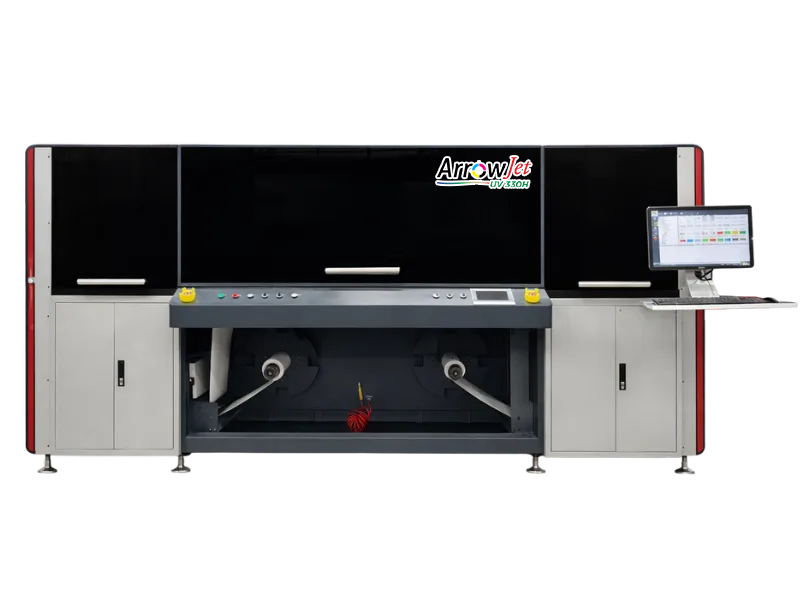
Equipment to evaluate
ArrowJet UV 330H
Confirm fit with your actual artwork, materials, and finishing requirements.
Buying criteria
What a UDI Label Printing Workflow Needs
Controlled identifier data
Separate fixed product identity from changing production fields. Define who approves data, how records reach the print workflow, and how the printed label is reconciled to the approved job.
Barcode quality, not resolution alone
A readable screen preview or successful handheld scan is not a substitute for barcode verification. Evaluate the actual symbol, size, contrast, quiet zones, and production material.
Material and exposure qualification
Test adhesive, substrate, ink, and protective finish as one construction. Include the cleaning, handling, storage, and any sterilization exposure relevant to the application; do not assume suitability.
Inspection and finishing
Plan die cutting, slitting, rewind direction, label application, rejected-label handling, and first-article checks alongside the printer. Finished-roll accuracy matters as much as print appearance.
Recommended directions
Arrow Equipment Options to Compare
Synthetic-label applications
ArrowJet UV 330H
Evaluate UV inkjet when the application calls for durable label graphics or white ink. Confirm material adhesion and exposure resistance using your actual label construction.
Qualified coated roll labels
ArrowJet Aqua 330R II
Compare aqueous pigment inkjet for coated paper or other qualified label stocks. Bring small text, variable fields, and barcode samples to the application test.
Finishing and inspection planning
Digital Label Finishing
Pair the selected press with a finishing workflow matched to the label shape, liner, roll format, and inspection requirements. Confirm the proposed configuration with Arrow.
Decision table
Choose Equipment Around the Label Application
| Your requirement | Direction to evaluate | What to confirm |
|---|---|---|
| Synthetic device labels exposed to handling | Evaluate UV inkjet and protective finishing | Test the complete construction under representative exposure conditions. |
| Coated secondary-packaging roll labels | Evaluate aqueous pigment inkjet | Confirm print quality, barcode grading, adhesive and application performance. |
| Lots, serials or expiration fields change | Use a verified data-to-print workflow | Check field formatting, record counts and first/last printed records. |
| Labels must be supplied as finished rolls | Include converting and inspection | Define cut registration, roll direction, quantity reconciliation and reject handling. |
Workflow notes
A Practical Qualification Sequence
- Define the label and its use. Identify the device/package level, label dimensions, approved content, expected life, and exposure conditions. Determine applicable UDI requirements and exceptions with your regulatory team.
- Prepare a representative test file. Use approved sample data and realistic barcode sizes. Include longest text fields and difficult variable-data cases rather than a single attractive demonstration label.
- Print, finish, and verify samples. Assess small text, barcode quality, ink/substrate compatibility, die cutting, adhesion, and application. Record the accepted material and operating setup.
- Approve a repeatable production process. Document job approval, version control, first-article review, routine verification, quantity reconciliation, and label-change procedures. Equipment alone does not establish regulatory compliance.
Related Guides and Sources
Buyer questions
Frequently Asked Questions
Is there one best printer for every UDI label?
No. Label material, barcode size, run length, variable fields, finishing, and exposure conditions determine the equipment fit. Ask for a production-like sample rather than choosing from resolution alone.
Does buying a digital press make our labels FDA compliant?
No. Compliance depends on applicable requirements, approved content, identifiers, quality controls, and the finished label. FDA describes UDI obligations and exceptions; your regulatory team should determine what applies.
Can lot and serial information be printed in the same job?
Potentially, with compatible software and a validated data workflow. Confirm required fields, sequencing, file handling, and verification on the proposed system before purchase.
Is scanning a barcode enough to approve print quality?
A scan checks whether a particular reader can decode the symbol. Verification assesses quality against the selected barcode standard. Define acceptance criteria and testing with your quality team.
Can the same setup print directly on a medical device?
Not necessarily. This page concerns labels and packaging. Direct-part marking can require different technology, materials, and validation and should be scoped separately.
Next step
Plan Your Medical Device Label Printing Workflow
Share your label file, dimensions, material, barcode format, variable fields, quantities, and exposure requirements. Arrow can help scope equipment and sample testing.
Discuss Your Application with Arrow